General ShoutBox

Refresh History
  • No Foul Language. No Mod-Off entrant Talk. No Spamming. Just good ol' General Chit Chat. For Modding Help Make A Post.
  • COD3-BRKR: @anthony dude I remember you. i was 12 years old modding my psp in 08. im glad the site is still up. i will be posting in the near future. with the technology and tool advancements of today we can do some cool mods
    September 25, 2026, 05:50:22 AM
  • anthonyta: Shout out to all the people who modded PSP's back in 07 in 08!! And thank you guys for sharing tutorials. I've learned so much since, will be modding my PSvita - wanted to see if anyone else is still interested in modding ahaha Cheers!
    September 21, 2026, 11:06:31 PM
  • COD3-BRKR: Checking in again. I got the idea to mod a psp like i did when i was a kid. Boy are they expensive now.
    September 11, 2026, 07:43:21 AM
  • Modded Matt: Site maintenance scheduled by host on 5/14.
    May 12, 2026, 04:18:40 PM
  • 802Chives: Matt check your DMs
    July 11, 2025, 11:15:38 AM
  • 802Chives: Unreal! I cant believe this place lives my profile still preserved! Kudos Matt and who ever still posts
    June 23, 2025, 07:31:18 PM
  • Jack lo svelto: Hi guys, I need your help. My JDM 055 has extreme right drift. That is, it remains fixed to the right without trembling, motionless. under the microscope I noticed the lack of capacitors c23 and c24. They may be the cause. I saw that they are connected to the headphone jack input. Can you tell me their value? Thank you.
    January 27, 2025, 02:17:15 PM
  • COD3-BRKR: Is this site dead?
    January 23, 2025, 07:18:38 AM
  • Monk3y: Been about 15 years fellas, needing some help in the PS3 forum if anyone active can lend a hand.
    January 07, 2025, 04:47:31 PM
  • shoulders: @hurricanemaiden - Did you install hall sensors?
    January 03, 2025, 10:41:42 AM
  • FOOKz™: boom
    December 29, 2024, 11:37:11 PM
  • hurricanemaiden: i have a xb1 slim controller, when i press the left trigger, the left analog stick moves
    December 21, 2024, 02:10:58 PM
  • hurricanemaiden: hi can someone help me ?
    December 21, 2024, 02:10:15 PM
  • Portu40: hi
    November 20, 2024, 02:14:08 PM
  • sinrockets: Hello world
    June 13, 2024, 02:47:23 AM
  • spartanking: alguien me puede compartr la comparacion de un ssd de xbox serie x,tengo uno que el ic de power  tiene un capacitor aterrisado y quiero saber si es normal o hay corto
    February 06, 2024, 07:13:58 PM
  • Bmhalleffect: Hello world
    February 01, 2024, 07:21:10 AM
  • Atof1808: Xbox analogs sticks s ans
    January 09, 2024, 02:06:13 PM
  • GhoSt: Have a great 2024 lads.
    December 31, 2023, 08:55:51 PM
  • crazy-modder: Did someone say OG?
    December 17, 2023, 09:43:07 PM
  • ViSioNXx: I don't consider myself an og persay... but definitely an alumni
    December 12, 2023, 01:05:25 AM
  • Rodent: Meant OGs
    December 06, 2023, 06:28:50 AM
  • ViSioNXx: Lol barely
    December 05, 2023, 11:56:02 PM
  • Rodent: Wow some Lags still alive
    December 05, 2023, 11:27:57 PM
  • ViSioNXx: Hmmm...
    December 05, 2023, 07:48:49 PM

Recent Posts

Pages: 1 2 [3] 4 5 ... 10
21
PS4 Controllers/PS4 Rapid Fire Controllers / Re: DualSense 5 Controller PCB Scans
« Last post by RDC on April 11, 2026, 03:45:08 PM »
@ aejt - 10uF, no idea on voltage, just toss in the highest value you can find in that size to be safe.


@ Stifu - That can be done a few ways so the stick function stays 100% and the WASD will do 'full' presses in the directions. You only need 4 wires soldered to the controller to do it no matter what method, X-axis, Y-axis, AN+ (1.8v) and GND.

W and S buttons common to Y-axis, then AN+ to one, GND to the other.

A and D buttons common to X-axis, then AN+ to one, GND to the other.

If W/S or A/D are backwards, just swap the AN+ and GND at them.

Now the catch there is, you need to be very careful with that setup though and make sure to never press W and S at the same time or A and D at the same time, or you will short out the AN+ rail in there and at best cause the controller to turn off, and at worst fry something. It would be better done with a couple of 470ohm or so Resistors in there on each button at the AN+ and GND spots, in case they were ever pressed at the same time. The more 'proper' method would be to code up a microcontroller (1.8v compliant) and let that be a 'go between' to handle your WASD presses and then 'tell' the controller what to do, that way you could code it to just ignore if W/S or A/D are pressed at the same time.
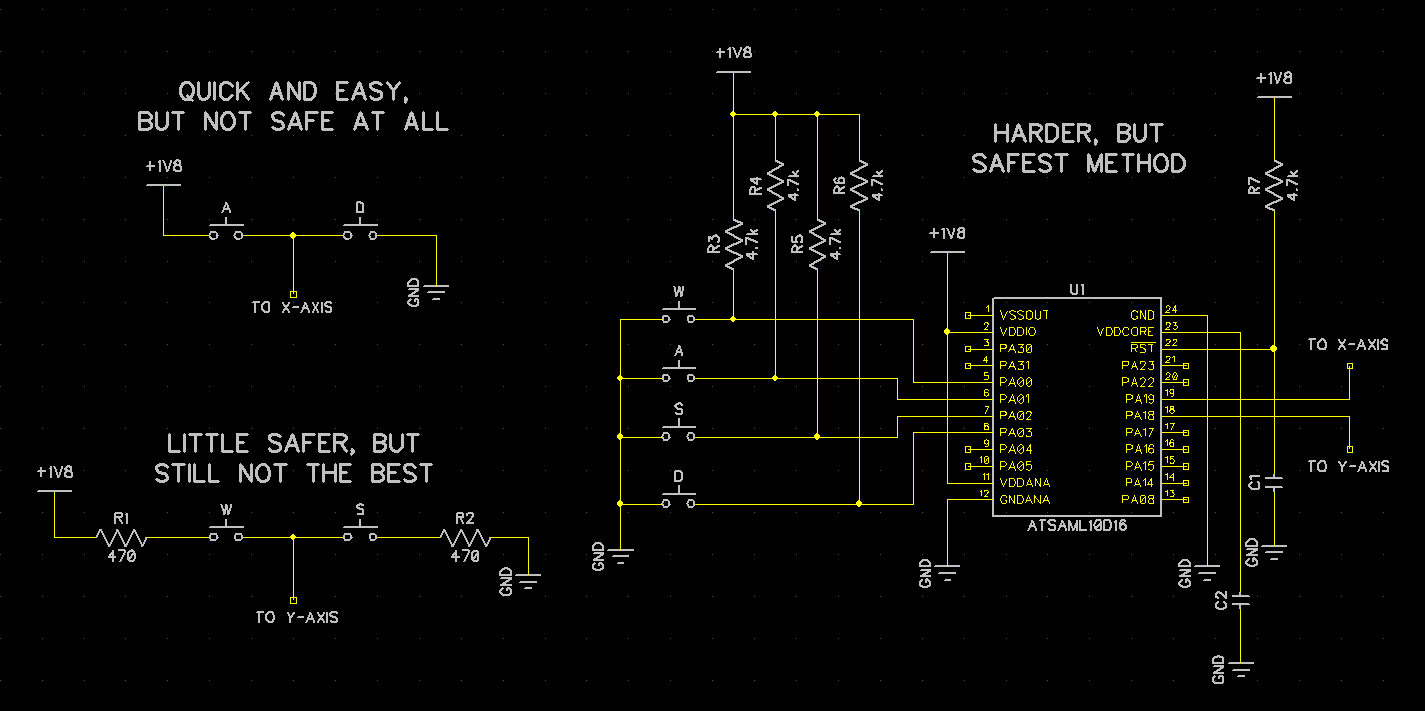


Code wise it wouldn't be much more than setting those X/Y lines to be Hi-Z all the time, so they don't interfere with how the controller normally works, and then only set them to Outputs and drive them Hi or Lo depending on which WASD is pressed.
22
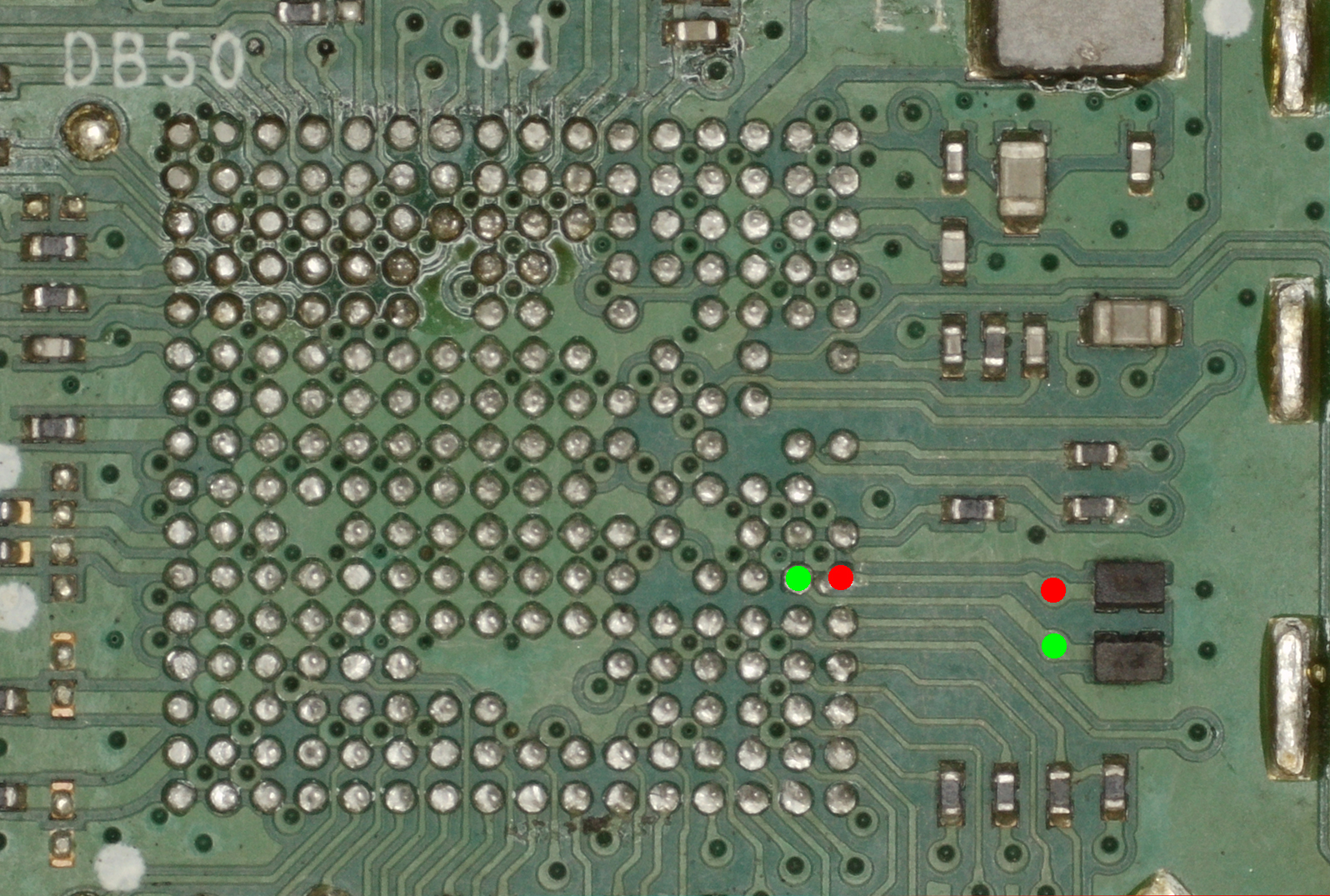
@ rickW86 - Left one is 100pF, right one is 7.5uF


@ MZ - It's on the list, but that 0201 stuff is so fiddly to measure and most of the board isn't silk screened, so that adds another level of fun to everything. The USB lines are buried on an internal layer. They pop back out right before the MCU.

FT1 = RED
FT2 = GREEN


23
PS4 Controllers/PS4 Rapid Fire Controllers / Re: DualSense 5 Controller PCB Scans
« Last post by Stifu on April 09, 2026, 11:49:08 PM »
Hi!

I've been designing a custom controller for ps5, something like the Azeron Cyborg and I have pretty much everything else now figured out (huge thanks to this forum) but what I'm still missing is that if is it possible to swap the left analog stick with WASD-keys?

Even better yet if I could have the analog stick and WASD-keys working at the same time so I could use keys while walking and stick while driving/flying vehicles.

For the first version I'm going to use a pcb from old controller but when I get that working I want to figure out if I could just do all the necessary wiring in the standard controller and add a connector to which I then connect my custom controller (or in this case it would be more like an accessory).
24
RDC,

I don't suppose you've managed to create the schematics for the MCU board yet, have you?

I'm trying to trace an issue with the D+ and D- lines. I can trace them as far as FT1 and FT2, but no further than that.


Cheers :)
25
PS4 Controllers/PS4 Rapid Fire Controllers / Re: DualSense 5 Controller PCB Scans
« Last post by aejt on March 26, 2026, 02:17:57 AM »
Anyone know what these capacitors' values are on the BDM-020 (and likely the same on later versions)? Specifically the lower one. I lost it and now the controller doesn't start.

There are smaller caps on the same net on the other side which closer to the SoC's leads, so I'm guessing those would be ~100nF and this one is higher like 1-4.7uF?

Edit: I now realized trying to start the controller without this cap likely fried it. Oh well.

 
26
Solved. Replaced data line double resistor/fuse.
Can you give me a little more details of this fix. Where is the data line double resistor/ fuse and what does it look like.
27
I have a BDM-40 board that refuses to charge after a TMR joystick change. I have changed the type C ports, but it still won't charge. I get 2 orange flashes when I plug in a USB without a battery, but no reaction if I put the battery back in. I have also tried different batteries, same result. The controller works when I power it on, but refuses to charge. Any tips on how to fix this? I tried a dock to It shows it was charging but I dont know if it actually did charge.
28
PS4 Controllers/PS4 Rapid Fire Controllers / Dualsense in MainFW downloader mode
« Last post by ZhenyaKa on March 19, 2026, 06:37:59 PM »
Dualsense is detected when connected via cable as MainFW downloader.

The Sony Accessories app does not help.
USB ID: HID\VID_054C&PID_0CE4&REV_0202

Are there any ways to revive him?
29
PS4 Controllers/PS4 Rapid Fire Controllers / Re: DualSense 5 Controller PCB Scans
« Last post by Para81szs on February 24, 2026, 11:40:01 AM »
Solved. Replaced data line double resistor/fuse.
I also have one that doesn't want to charge regardless of the source (usb or dock)... do you have any idea what to start with?
info BDM 50v2
30
Welcome.

Guide turning the controller on but not registering that button, I'd look at D27 first, make sure it's on the board. Then all of the traces and such to/from it to Guide and J3p2. Quicker test would be to just swap over a known good top board. If it still has that same no Guide button issue, then it's either some trace to the MCU, or that MCU has an issue. Can also try a firmware update to see if there are any changes.
Pages: 1 2 [3] 4 5 ... 10
SMF spam blocked by CleanTalk
SimplePortal 2.3.5 © 2008-2012, SimplePortal